
Adding the Auger. Step two of a DIY record.
Posted: November 11, 2012 Filed under: Homemade Boiler, Hopper and Feed | Tags: auger feed, boiler, homemade chip boiler, welding Leave a commentIt may seem like a small bite but step two actually requires some machining and tweaking to get correct. In this step I am going to add the auger to the pipe assembly I have already built. To do this I need to support the auger with bearings so the shaft will be cantilevered in the pipe. The auger should not touch the pipe and needs to be centered in the pipe, at least within a reasonable distance. To do this I cut some 1 x 2 square tubing and then drilled holes on the Bridgeport using the Digital Readout to measure the distance so that the bearings would fit perfectly. These particular bearings are an oil impregnated bronze bushing in a pillow block configuration. The pillow block configuration is aluminum which makes machining the pillow block easy. Here’s a picture of the key way which I machined into a piece of 1″ cold rolled. If you have the choice cold rolled is much easier to work with then hot rolled for shafts. Of course this is really not shaft stock it is round stock but it works just fine and is inexpensive.

Shaft with key way machined and auger ready to weld onto shaft
After welding the auger onto the shaft I do the calculations to center the shaft in the pipe. To make the shaft centered I have to mill some of the pillow block bearing, as you can see in the picture I had to use a circular shim to get the auger centered in the pipe.
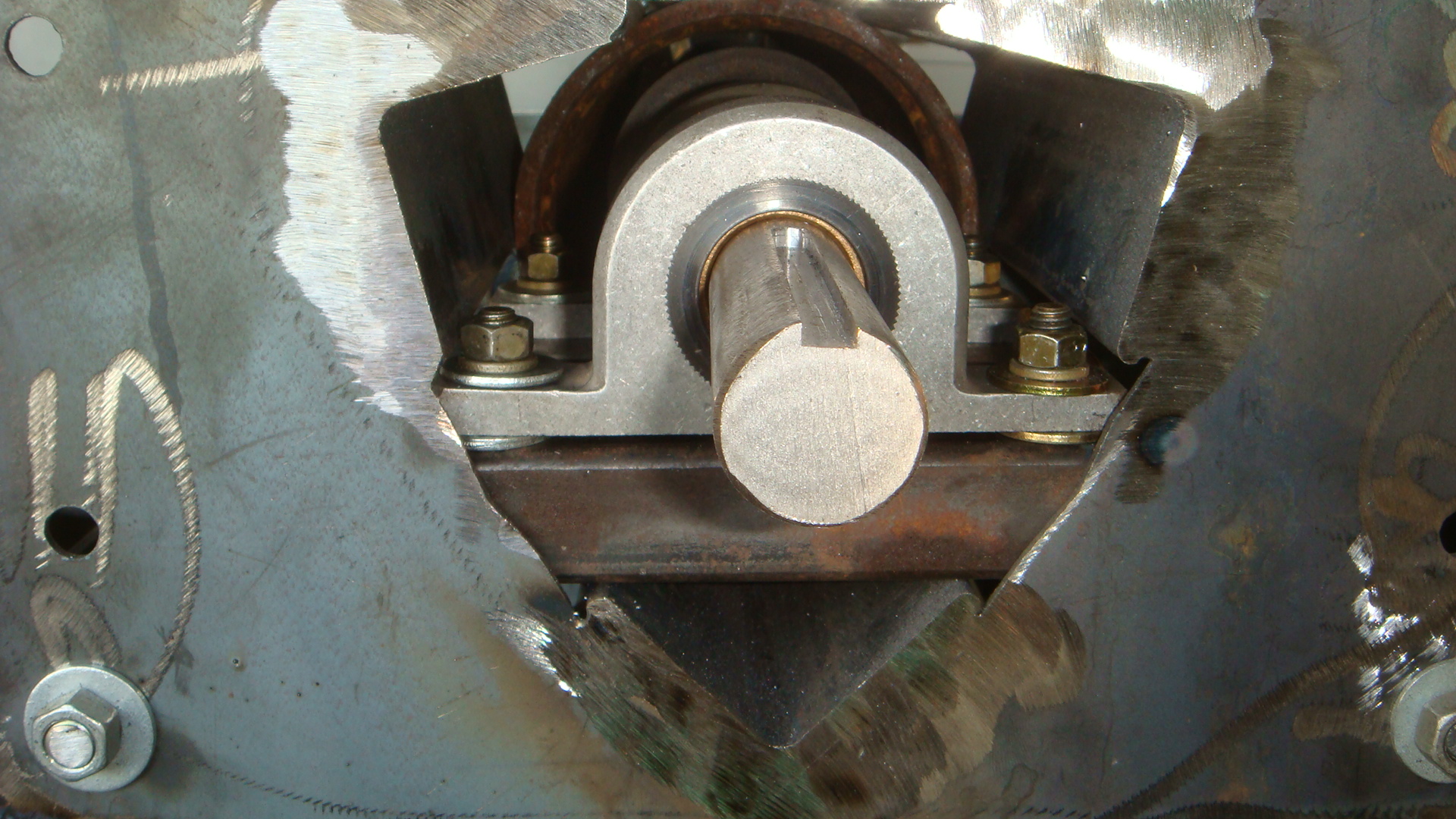
End view showing the machine pillow block bearings mounted onto 1 x 2 square tubing
Finally after some adjustment you can see the end result of the auger centered in the feed pipe.

Auger centered in pipe, cantilevered with two pillow block bearings
Auger Feed Rebuilding, Step one a DIY Record
Posted: November 2, 2012 Filed under: CNC Plasma Cutter, Homemade Boiler, Hopper and Feed | Tags: auger feed, CNC Plasma, DIY, homemade, homemade chip boiler, welding Leave a commentAfter last winter’s experience, I decided to start from scratch on the auger/hopper assembly. I varied the height several times through different burner designs. Now it looks like it was modified once too many times. The other main reason to rebuild the hopper assembly is the difficulty removing the burner from the boiler because it must stay balanced. I don’t remember exactly my thoughts at that point, I probably just had two wheels around the shop and was in a hurry.

2011 Hopper and Auger Assembly
So this fall I am rebuilding the hopper with a different auger drive system, and additional wheels and supports to make it much more robust and simple. The foundation of improvement in the new assembly is the ability to draw the parts in SketchUp as well as cut the parts with the CNC. Here’s a view of the cut out parts.
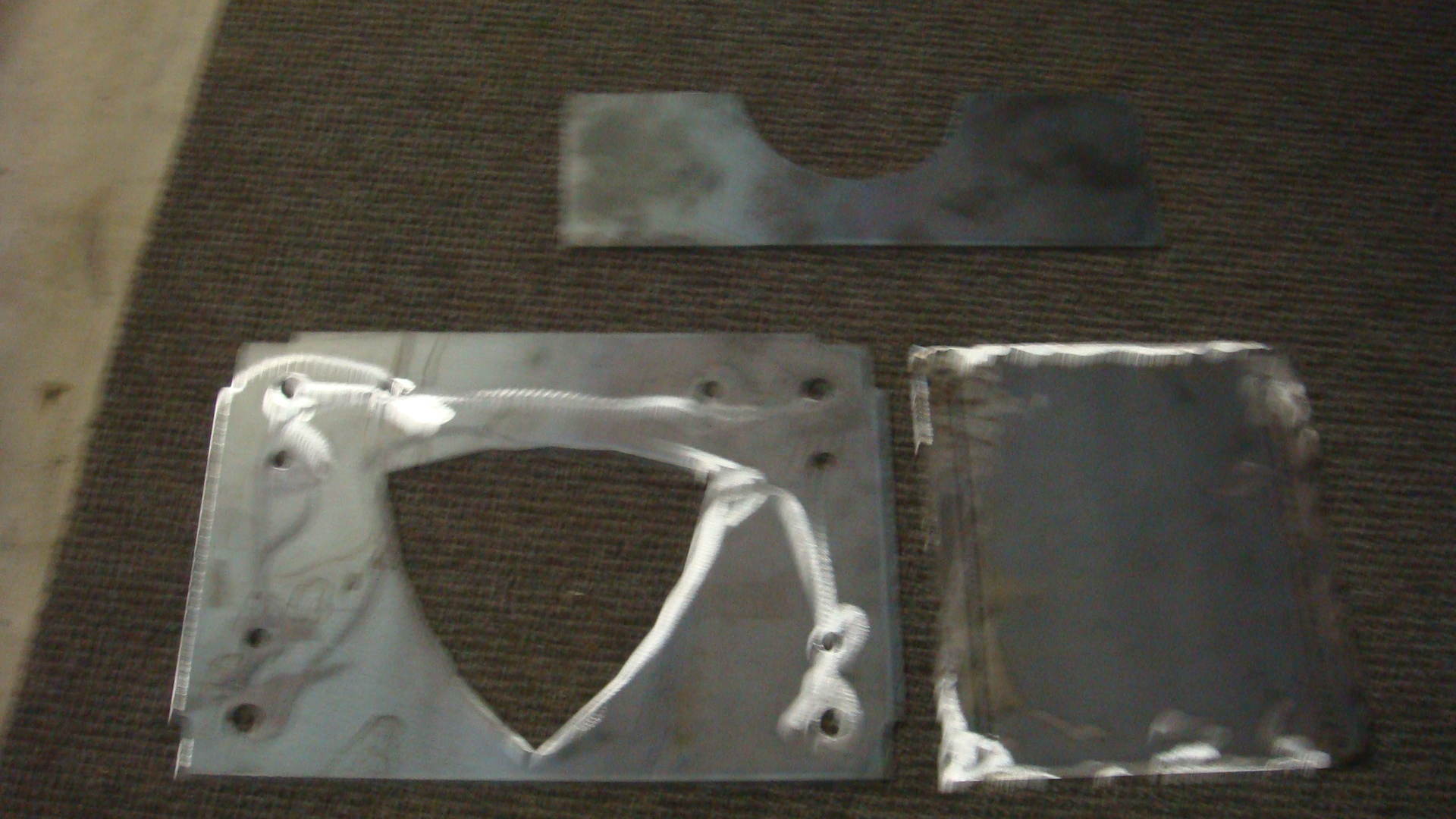
The parts laid out I call the saddle, angle iron, and side alignment plate.
The parts below are the angle iron plate with the side alignment plate. The angle iron plate is tabbed to fit into the slots of the side alignment plate, this way the parts are self aligning and jigging. Adding strength and ease of assembly. This makes the welding so much easier.
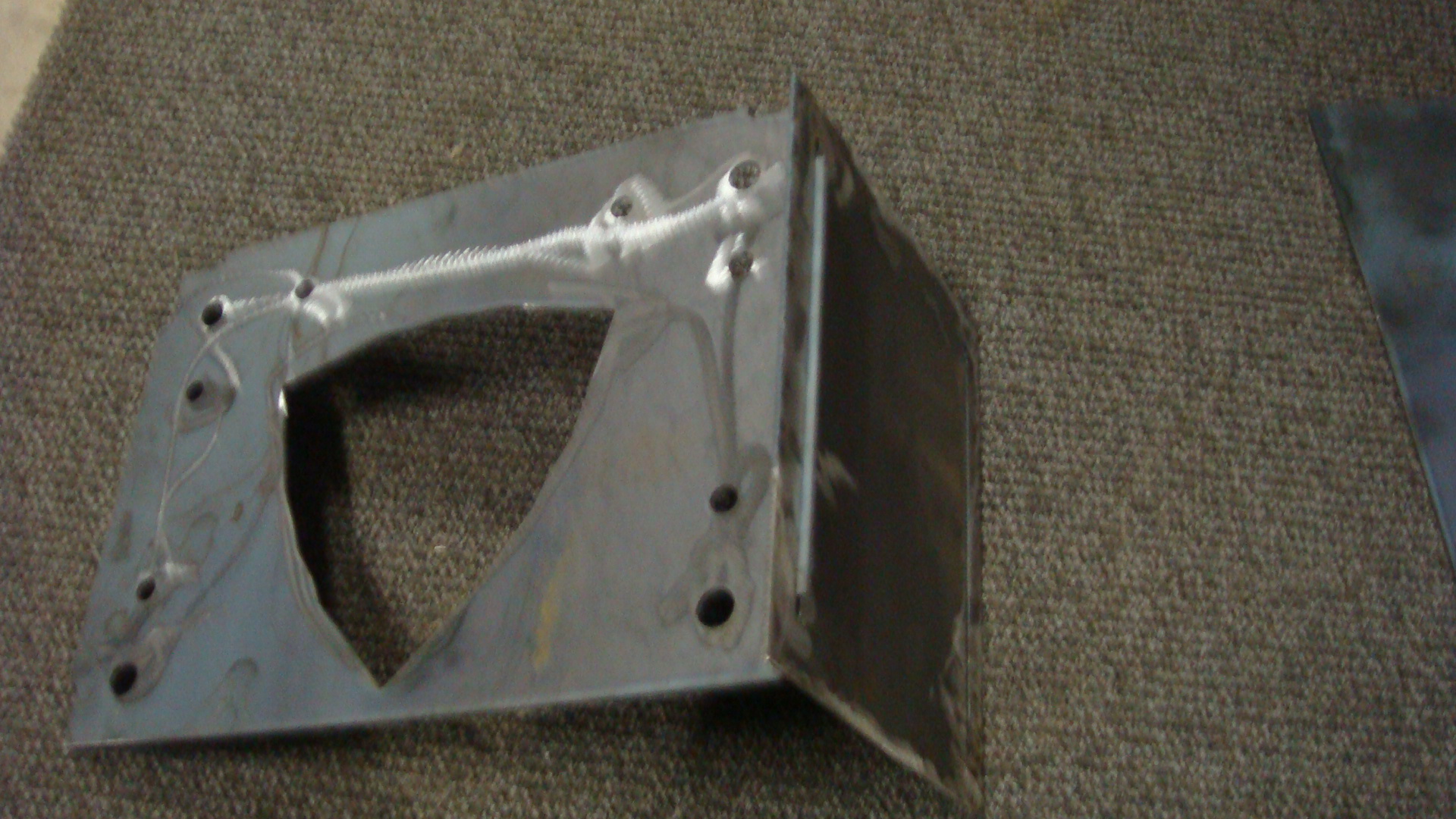
Finally here is the assembly on the welding table ready to weld, note the threaded rod, which also aids in the rigidity and ease of adjustment to make sure all the pieces are square and parallel prior to welding.

Unwelded auger drive weldment ready to be welded
And finally the partially finished welded assembly, this assembly will be the foundation to cantilever the auger in the feed pipe as well as support the auger drive motor and gears.

End view of the welded assembly
The CAD designed parts combined with the CNC, combined with self jigging design for success make a nice finished assembly with light material for cost savings combined with good strength.
CNC painted and working great
Posted: October 23, 2012 Filed under: CNC Plasma Cutter | Tags: CNC, CNC Plasma, welding project Leave a commentNotice the title didn’t say completely finished since the last few steps are to improve the acme screw feed as well as add a water table, ventilation system and wire up a better connector for the torch control. But the paint looks great and the electrical components in a box is great. The part you see cut is intended to be the plate that is the interface between the boiler and the burner. I call it the burn plate. It will go into the opening in the boiler, the holes in the very bottom will allow a resistance heater to light the biomass either pellets or chips, the holes above are for draft. The large hole in the top center is for the auger feed and the remaining holes are on the left, a fire detector sensor and a hole to be tapped for attaching the sensor. The two holes in the upper right are intended to be the swivel point and observation port to observe the flame. I drew the part that you see pictured up in Google Sketch Up. What really impressed me about Sheetcam is that the piece to swing and hide the flame in the observation port was made at the same time from the scrap that was cut out of the auger hole. Sheetcam automatically figured out the hole in this swinging part should be cut as a hole with the offset of the kerf to be on the inside of the hole, then cut the remaining profile as a outside kerf, then cut the auger hole as an inside hole. This was all done in the correct order automatically. Cool! Sheetcam is a great program.

Cnc with cut Burner plate
Cnc with cut Burner plate
Homebuilt Plasma cutter tested and functional
Posted: October 6, 2012 Filed under: CNC Plasma Cutter | Tags: CNC, CNC Plasma, homemade chip boiler, welding Leave a commentThe plasma cutter is working in the CNC mode! I have successfully cut parts that meet dimensions and are usable. I made the plates that mate with the casters for the bottom of the machine this morning. I have them welded on and working. It was a treat bolting them together with no alignment issues without spending the time to make them on the Bridgeport.
The CNC is not finished, I have to mount the cable tracks, as well as extend some of the stepper motor wires to allow the full movement of the machine. Before I move on I want to put a coat of paint on the steel parts to make it look finished and professional. But an important milestone has been reached. This machine will allow me to make parts designed on the computer as well as improve the quality of the chip boiler parts significantly. This week I intend to finish the CNC and rebuild the hoppers support wheels. More pictures when I finish the CNC.

Cutting parts from scrap for testing
Radio data transfer!
Posted: September 11, 2012 Filed under: Arduino, XBee | Tags: Arduino, data logger, Xbee radios Leave a comment
I have been working through some of Robert Faluidi’s excellent book ” Building Wireless Sensor Networks with Zigbee, Xbee and Arduino Processing” Working with these radios has been a lot of fun. The book is a great introduction to the basics and gives you a great idea for what can be done with a little imagination.
My plan for the chip boiler is to continue building and testing blocks of code that will be all integrated into the boiler control program at least at some point for some of the testing period. Last winter the boiler ran for approximately a month and a half. In that time there were many starts and stops which made me wish the Arduino could provide better data for the feedback of the program itself, hence the data logging program just tested.
A second desire is the real time temperature monitoring of the boiler water as well as the auger feed pipe temperature. Hence the need for wireless radio temperature monitoring. That is what the wireless data transfer will accomplish. I am picturing a simple box with a LCD screen to display the data running on a 9v battery. Video to follow soon. Thanks as always for reading.
Milestones, why we need to take a minute.
Posted: September 10, 2012 Filed under: Arduino, MicroSD card, OPenLog | Tags: Arduino, data logger, micro SD, temperature recorder Leave a commentThere is so much to do in life, so much to to make, test, verify, improve, install etc. that it is good to look back on goals completed and know that progress is being made. I think that is why I like programming so much, it is near instant feedback to test and observe the results. In my outside of night work hobby life I am finally going to get a machine out of my shop that has been there nearly a year. That is going to free up a lot of physical space, but mentally I know it is going to be huge. A constant reminder of time and money gone. YEA!
On the project side I received a package I ordered from Yourduino.com to complete a phase of the OpenLog testing. My plan has been to create a temperature recorder with a real time clock using a Arduino Uno logging time and temperature data to OpenLog’s microSD card recorder. Here is the finished code, that compiles and works.
/*
Temperature and Time recorder test
This code records time and temperature to a microSd card, this is a test program to prove the ability and
allow the code to be used in other programs as part of a larger code development
A thermistors is attached to analog pin 0
The Real time clock SDA pin is attached to analog 4, the RTC SCL pin is attached to analog pin 5
The circuit:
Arduino Digitial Pins
0 RX to MicroSD TX
1 TX to MicroSD RX
2 to MicorSD GRN
3
4
5
6
7
8
9
10
11
12
13
Inputs
* Thermister, Analog in 0
* RTC SDA, Analog pin 4
* RTC SCL, Analog pin 5
Created 9/10/12
http://www.frugaltinker.com
*/
#include <math.h> // include the library code for thermsiter functions
#include <Wire.h>
#include “RTClib.h”
RTC_DS1307 RTC;
// define I/O pins
// define constants for clarity
// define variables
int statLED = 13; //toggles LED
int resetOpenLog = 2; //reset OpenLog
int hour = 0; // clock hour
int minute = 0; // clock minute
// the following variables are long’s because the time, measured in miliseconds,
// will quickly become a bigger number than can be stored in an int.
unsigned long prevmillis = 0; // prevmillis
long DisplayDwell = 7500; // dwell time of 7.5 secs
//define function to calculate the temperature in fahrenheit for Analog pin 0
double Thermister(int RawADC) {//beginning of function
double Temp;
Temp = log(((10240000/RawADC) – 10000));
Temp = 1 / (0.001129148 + (0.000234125 * Temp) + (0.0000000876741 * Temp * Temp * Temp));
Temp = Temp – 273.15; // Convert Kelvin to Celcius
Temp = (Temp * 9.0)/ 5.0 + 32.0; // Convert Celcius to Fahrenheit
return Temp;
}//end of function
void OutsideTempSection() {// outside temp section
Serial.print(Thermister(analogRead(0))); //print to the lcd should be the Outside temp if thermistor is hooked up properly
Serial.print(“, “);
}// end outside temp function
void TimeSection() {//start time function
DateTime now = RTC.now();
hour=now.hour(),DEC; //get the hour from the RTC chip
minute=now.minute(),DEC; //get the minute from the RTC chip
if (hour>=13) //PM Section
hour=hour-12; //printed hour is the hour
Serial.print (hour); //prints the hour
Serial.print (“:”); // prints a colon
if (minute<10) //adds a “0” if the time is single digit
Serial.print (“0″);
Serial.print(minute); //prints minuts
hour=now.hour(),DEC; //get the hour from the RTC chip
if (hour>=12) // prints pm
Serial.println (” PM”);
if (hour<12) // prints am
Serial.println (” AM”);
}// end time function
void setup()
{//Begin Setup section
// pinMode(ledPin, OUTPUT);
pinMode(statLED, OUTPUT);
pinMode(resetOpenLog, OUTPUT);
Wire.begin();
RTC.begin();
RTC.adjust(DateTime(__DATE__, __TIME__));
Serial.begin(9600); //initiate serial communication and define baud rate
delay (1000); //delay 1 sec for the data logger to begin
//Reset OpenLog
digitalWrite(resetOpenLog, LOW);
delay(100);
digitalWrite(resetOpenLog, HIGH);
//Wait for OpenLog to respond with ‘<‘ to indicate it is alive and recording to a file
while(1) {
if(Serial.available())
if(Serial.read() == ‘<‘) break;
}
//Send three control z to enter OpenLog command mode
//Works with Arduino v1.0
Serial.write(26);
Serial.write(26);
Serial.write(26);
//Wait for OpenLog to respond with ‘>’ to indicate we are in command mode
while(1) {
if(Serial.available())
if(Serial.read() == ‘>’) break;
}
//send the open file
Serial.print(“Templog.txt\r”); //\r in string + regular print works with older v2.5 Openlogs
//Wait for OpenLog to return to waiting for a command
while(1) {
if(Serial.available())
if(Serial.read() == ‘>’) break;
}
// send the command to append the file
Serial.print(“append Templog.txt\r”);
//Wait for OpenLog to indicate file is open and ready for writing
while(1) {
if(Serial.available())
if(Serial.read() == ‘<‘) break;
}
} //End setup section
void loop()
{//Begin Loop section
if (millis()-prevmillis> DisplayDwell)
{//start if sections
OutsideTempSection(); //checks and displays the outside temp section
TimeSection(); //displays the time
prevmillis=millis();
}// end if section
}//End loop section
Why spend your evenings and weekends welding and programming?
Posted: August 31, 2012 Filed under: Homemade Boiler | Tags: Arduino, currency fluctuation, oil, oil prices, welding Leave a commentI have been following the pre buy prices of oil for a while now. For those of you unfamiliar with the term “pre buy”. It is what is sounds like, the price of the oil you will have delivered is prepaid by you and you and your supplier determine how many gallons you should buy. If you over buy you can usually take the remaining gallons you bought in a final delivery and store that amount in your own tank for next year. If you can’t hold that much you get a refund, but my supplier would not hold that price for anything longer than one season. If I under bought they usually would allow me the pre buy price on additional gallons if I used their estimate of how many gallons to buy.
Below is a .pdf chart of the pre buy prices by year. Note the chart also has a straight line regression trendline based on the existing data. The line is extrapolated out and predicts what the coming years prices may become. Note also that for a period of years the trendline and the prices were relatively accurate and tight to the trendline. I think as time goes on the market may become more volatile. The world market for oil is currently in the dollar currency. This may also add to the price fluctuations as the dollar currency may become volatile as well as the oil market’s geopolitical issues may also add to the fluctuation. Makes me want to get off the merry go round. Note clicking on the link should bring up the chart as a pdf file. Bear with me as a I try different ways to express things in wordpress. Suggestions are welcome.
OpenLog partially tested
Posted: August 24, 2012 Filed under: Arduino, Data logging, OPenLog, Testing | Tags: Arduino, data logger, RTC, Thermister Leave a commentWell I have to say, I am not particularly impressed with OpenLog’s documentation but I finally got a sketch to work with OpenLog based heavily on the OpenLog command sketch. I soldered up a Yourduino.com Real time clock kit and am waiting on some male to male jumper wires to breadboard up a thermistor and clock to fully test the OpenLog data logging in a closer to real world trial. Of course until it is finally mounted in the boiler control box and mounted on the boiler this will only be the next step in testing.
Hard experience has taught me many things work on the desk that do not work in the field due often to poor electronic practice, missing diodes, filtering capacitors, missing resistors….
Here is the code which I intend to run when I get the project bread boarded, it compiles but is untested.
/*
RTC, Thermisoter, OpenLog test
One thermistor attached to analog pins 0
The Real time clock SDA pin is attached to analog 4, the RTC SCL pin is attached to analog pin 5
The circuit:
Inputs
* Thermister Analog in 0
* RTC SDA, Analog pin 4
* RTC SCL, Analog pin 5
Outputs
* Arduino digital 0 (rx), OpenLog TX
* Arduino digital 1 (tx), OpenLog Rx
* Arduino digital 2, OpenLog Grn
Created 8/24/12
http://www.frugaltinker.com
*/
#include <math.h> // include the library code for thermsiter functions
#include <Wire.h>
#include “RTClib.h”
//section for time keeping
int hour; //hour
int minute; //minute
int Roomtemp; //room temperature
int statLED = 13; //flashes LED connected to pin 13 for troubleshooting
int resetOpenLog = 2; //reset on OpenLog
long DataDwell = 60000; //seperates the data readings by 1 minute
long prevmillis =0; // previous millis
RTC_DS1307 RTC;
//define function to calculate the temperature in fahrenheit for Analog pin 0
double ThermisterRoom(int RawADC) {//beginning of function
double Temp;
Temp = log(((10240000/RawADC) – 10000));
Temp = 1 / (0.001129148 + (0.000234125 * Temp) + (0.0000000876741 * Temp * Temp * Temp));
Temp = Temp – 273.15; // Convert Kelvin to Celcius
Temp = (Temp * 9.0)/ 5.0 + 32.0; // Convert Celcius to Fahrenheit
return Temp;
}//end of function
void TimeSection() {//start time function
DateTime now = RTC.now();
hour=now.hour(),DEC; //get the hour from the RTC chip
minute=now.minute(),DEC; //get the minute from the RTC chip
}// end time function
void OpenLogData(){//start OpenLogData function
int RoomTemp = ThermisterRoom(analogRead(0)); //read from the sensor
Serial.print (hour);
Serial.print (“:”);
Serial.print (minute);
Serial.print (“, “);
Serial.println (RoomTemp);
}// end OpenLog Data section
void setup()
{//Begin Setup section
pinMode(statLED, OUTPUT); //set pin to output
pinMode(resetOpenLog, OUTPUT); //set pin to output
Serial.begin(9600); // initiate serial communication
//Reset OpenLog
digitalWrite(resetOpenLog, LOW);
delay(100);
digitalWrite(resetOpenLog, HIGH);
//Wait for OpenLog to respond with ‘<‘ to indicate it is alive and recording to a file
while(1) {
if(Serial.available())
if(Serial.read() == ‘<‘) break;
}
//Send three control z to enter OpenLog command mode
//Works with Arduino v1.0
Serial.write(26);
Serial.write(26);
Serial.write(26);
//Wait for OpenLog to respond with ‘>’ to indicate we are in command mode
while(1) {
if(Serial.available())
if(Serial.read() == ‘>’) break;
}
//send the open file
Serial.print(“Templog.txt\r”); //\r in string + regular print works with older v2.5 Openlogs
//Wait for OpenLog to return to waiting for a command
while(1) {
if(Serial.available())
if(Serial.read() == ‘>’) break;
}
// send the command to append the file
Serial.print(“append Templog.txt\r”);
//Wait for OpenLog to indicate file is open and ready for writing
while(1) {
if(Serial.available())
if(Serial.read() == ‘<‘) break;
}
//start process of setting clock time
Wire.begin();
RTC.begin();
RTC.adjust(DateTime(__DATE__, __TIME__));
} //End setup section
void loop()
{//Begin Loop section
if (millis()-prevmillis> DataDwell)
{//start if sections
TimeSection(); //displays the time
OpenLogData(); //saves the time and solar temp to the SD card
prevmillis=millis();
}// end if section
}//End loop section
OpenLog Firmware updated and tested
Posted: August 20, 2012 Filed under: Arduino, Data logging, OPenLog, Testing | Tags: data logger, micro SD, RTC, solar hot water Leave a commentOpenLog is a data logger from SparkFun electronics that is touted as being easy to use and a reliable writer to a microSd card. I haven’t found that to be true, I think it is a pain in the a** but maybe that’s the experience more than the actual product. I ordered the data logger in January and got busy and didn’t have the time to use it so I set it aside.
Really the only reason I ordered it was because I could not get GoBetwino, a Freeware Arduino Data logging software program to work. The GoBetwino program uses a USB connection to a computer connected to the Arduino to log to a file on the PC. A great concept that I tested and worked fine on the desktop machine. However on the laptop that I was using to make changes to the Arduino controlling the boiler in the shop it didn’t work. It seemed easier to come up with a standalone solution rather than troubleshoot the USB connections, the power managment issues with the Laptop etc. So I bought the data logger.
As I wrote in an earlier post since the time of my purchase of the OpenLog board it was recommended to update the firmware, this required updating the board with a FTDI board that accepts the USB connection from the PC to update the firmware, after 2-3 hours of frustration this task is finally completed. The main problem being Windows XP didn’t seem to recognize the FTDI board and assign it a com port but finally was able to find the correct driver and download the firmware.
I ran the test sketch, pulled the micro SD card and reviewed the data. The board did log the data correctly so the next step is to write a function that writes temperature data to a file with a time stamp. Since I have an Arduino on my desk with a real time clock chip that measures the outside temperature as well as the temperature of a solar hot water storage tank this would seem like a perfect application to test. After testing the function in that application it will be easy to modify the function for the monitoring of the boiler function. I prefer to write the code in functions and call the functions from the main body of the loop. This makes the code modular and easy to reuse. I comment very carefully and probably over comment, but I personally prefer to make the code painfully simple to understand on the assumption I may not look at the code again for a few years. I am hoping you will comment as well since your comments will no doubt improve the code.
I will post the function when I complete it. Thanks for reading.
CNC Plasma cutter works with Sharpie!
Posted: August 19, 2012 Filed under: CNC Plasma Cutter | Tags: CNC 1 CommentAfter assembling all the lead screw nut to carriage connections the machine is testable. I ran a program supplied with Linux Enhanced Machine Controller that required coordinated motion between the axes. This came out in an interesting way, mirror image. I figured out that the y axis was opposite from the expected direction, or in other words, when the program called for a positive y axis move, the machine delivered a negative y axis move and vice versa. This was a simple fix, I physically picked up the axis and moved it end for end with a helper and remounted it. After that the test program ran just fine.

Mirror Image with y axis reversed
Image with corrected axis, you can see a little of the same program showing the E in the correct orientation, as well as a 5″ x 5″ box program that I was able to import from StepCam, although I did have to edit the program to get it to run.

Corrected axis Image of the start of the same program
Next on the CNC list is to order some additional materials from McMaster-Carr to finish the Z axis as well as some electrical routing accessories to finish the limit switch installations. Last but not least I will need to improve the mounting of the sharpie, plasma cutter and whatever other option should be available for this machine. No doubt a router head would be useful as well. I have the material for the fabrication of a base so I will start on that this coming week as well. Of course this is not the only thing on my list, I still have to make a living so progress will be measured in hours. Thanks for reading, and tell your friends.
 frugaltinker