
Electrical box and paint, Step 7 of a DIY record
Posted: December 4, 2012 Filed under: Hopper and Feed | Tags: Arduino, auger feed, DIY, homemade chip boiler, lcd display, welding project Leave a commentIt took me longer than I would like, but the hopper/auger assembly is now painted and the electrical box is mounted and the wiring is functional. I have mounted the Arduino and LCD display. That box also contains the board that accommodates the thermistor electronics, which are the sensors that read various temperatures.
The main electrical box is a stainless steel box I picked up used from a scrap yard, putting the frugal in frugaltinker.com. That’s the reason that there are so many holes in the box, however it was such a good deal I thought it was worth it, despite the cosmetics. The cover was just too ugly to leave be, so I attempted to skin the cover with a plate which I plasma cut in “Frugaltinker.com”. This doesn’t show up too well, I probably should paint a background behind it to make it stand out better. Painting a background seems low on the to do list right now, so I think I will skip that task and focus on the burner.
The CNC was invaluable in the production of the electrical mounting plate, mounted inside the electrical box. It was great to not have to drill any holes to mount anything. All the holes were cut with the CNC and fit just fine.
So the final task is complete before the burner is welded up and tested.
Adding the hopper, Step 6 of a DIY record
Posted: November 26, 2012 Filed under: CNC Plasma Cutter, Hopper and Feed Leave a commentI built a homemade brake to bend sheet metal and it works OK, not great. The corners are really radius’s and fairly large ones at that. The second and main issue I have with it, is the inconsistency that comes from the bends. I find that even though I try to align things perfectly it does not work that way. Some of the parts I have made lately I have cut some slits with the CNC to weaken the folded edge making it more consistent and I wish I had done this for this part of the project….Anyway, a quick reminder of last years effort.

Last years hopper, auger and burner combination
As you can see the hopper is quite small and I ended up adding an extension later. The burner is integral to the hopper and auger, making it very difficult to make any changes to the burner. Lastly the legs are welded on and have no adjustment and seriously two wheels what was I thinking? So while the principal is the same there are some major differences.

New hopper with tabbed gussets
It’s pretty challenging to align four pieces of steel of such odd shapes and weights, so in this iteration I cut some gussets with tabs to fit into a slot in the end pieces of the hopper. This keeps the end pieces fixed from side to side because of the slot and plumb as it is butted up to the square the gusset forms. All from welding a gusset plumb. So that was an aid to success, of course as soon as I finished I tossed some ideas around with a friend and we thought up a perhaps better way by making two peices instead of four and doing a different bending technique. Next time. In the meantime this is straight, level and functional. Almost done with the hopper/auger assembly, The last task is to mount the electrical box and paint the entire assembly while it is still apart and then assemble it into a working machine and test the auger drive.
Adding wheels, Step five of a DIY Record.
Posted: November 23, 2012 Filed under: Hopper and Feed | Tags: auger feed, CNC Plasma, homemade chip boiler, welding, welding project Leave a commentI often have to cut multiple parts, so when I do, I take the opportunity to experiment a bit. In this series of cuts I changed the amperage of the Plasma cutter, a Hypertherm 45. Hypertherm plasma cutters are American made, designed and built, only about a 45 minute drive away from me. I still haven’t gotten my free T shirt for buying and registering the machine but I guess that’s another story… anyway, amazingly enough there really is not a lot of difference in the dross or slag between the three different amp settings I tried. I’ll keep experimenting to try to optimize the cut quality and speed of the CNC machine, plasma cutter combination.
The auger pipe connects the burn plate which attaches to the boiler and forms the interface between the auger feed and the boiler/burner units. I took a piece of 6″ pipe and welded it to the boiler plate and this attaches the plate to the auger feed via screws that tighten. With this assembly I can detach the auger and hopper and test a different burner simply by loosening 6 screws. Modular design for ease of design changes and maintenance.

Burn plate attached to auger via screws tightened 120° apart
I attached the hopper plate first because this determines the wheel height required. I slotted the holes in the saddle plates so that there is about 3/8″, or about a centimeter of adjustment up or down adjustment. Then after careful alignment I assembled the entire assembly with clamps and threaded rods. I did cut and weld in some cross pieces with gussets

Cross bars with CNC cut gussets and CNC cut caster plates

Close up of carriage assembly welded to auger tube
This will make maintenance of the boiler, ash removal, scraping of the burner holes, boiler tube cleaning very easy by simply rolling the auger/hopper assembly out of the way.
Mounting the auger drive motor. Step four of a DIY record.
Posted: November 19, 2012 Filed under: Hopper and Feed | Tags: auger feed, Auger motor, CNC, CNC Plasma, DIY, homemade chip boiler, welding project Leave a commentIn this step I mount the auger drive motor, it has a built in right angle drive and speed reducer which adds torque. The motor comes complete ready for wiring and mounting using four screws. Again I drew up the parts in SketchUp and then cut them out on the CNC plasma cutter, it was almost too easy. The further I get down this path the more I take advantage of the CNC’s capabilities. Note the rounded corners, I also added an extra hole on top of the motor mount plate to make adding a wire routing clip easier in the future. I remade the worm drive plate to improve some of the adjustment capabilities and added at the same time some decoration, rounded corners and used less material.
I used a Lovejoy type shaft connector to connect the motor to the worm shaft with a Buna-N spider in between to minimize any vibration or backlash to the motor, although with the worm and worm gear combination there should be none.

Adding the worm gear and worm. Step three of a DIY record.
Posted: November 12, 2012 Filed under: Homemade Boiler, Hopper and Feed | Tags: auger feed, CNC, CNC Plasma, homemade chip boiler, welding Leave a commentThis step was made simple by the use of the CNC plasma cutter to make a part which I then bent up on both ends using my homemade brake. But first let’s revisit the old configuration for comparison.

Chain drive transmission of the auger drive, used on the last configuration
I had to rob the motor and some parts from this transmission so it is in disarray but you get the idea of the complexity. It requires four sprockets, two chains, a motor and two chain tensioners. Here is a picture of the newly implemented and untested solution for mounting the worm and worm gear.

Worm gear keyed to shaft, worm gear mounted on cross shaft.
The CNC made it easy to slot the holes for adjustment, so the vertical adjustment comes from the plate to plate mounting screws, and the bearing mounting holes are slotted to get correct in and out adjustment to the keyed worm. After cutting the part and mounting it I decided what to change in the next iteration. I modified the part to round all the corners so that there are no sharp edges and extended the plate to pick up a second set of holes so the plates are attached with four screws instead of two. I think this part is perfectly functional so I won’t implement the changes but at least the SketchUp drawing has been updated.
Adding the Auger. Step two of a DIY record.
Posted: November 11, 2012 Filed under: Homemade Boiler, Hopper and Feed | Tags: auger feed, boiler, homemade chip boiler, welding Leave a commentIt may seem like a small bite but step two actually requires some machining and tweaking to get correct. In this step I am going to add the auger to the pipe assembly I have already built. To do this I need to support the auger with bearings so the shaft will be cantilevered in the pipe. The auger should not touch the pipe and needs to be centered in the pipe, at least within a reasonable distance. To do this I cut some 1 x 2 square tubing and then drilled holes on the Bridgeport using the Digital Readout to measure the distance so that the bearings would fit perfectly. These particular bearings are an oil impregnated bronze bushing in a pillow block configuration. The pillow block configuration is aluminum which makes machining the pillow block easy. Here’s a picture of the key way which I machined into a piece of 1″ cold rolled. If you have the choice cold rolled is much easier to work with then hot rolled for shafts. Of course this is really not shaft stock it is round stock but it works just fine and is inexpensive.

Shaft with key way machined and auger ready to weld onto shaft
After welding the auger onto the shaft I do the calculations to center the shaft in the pipe. To make the shaft centered I have to mill some of the pillow block bearing, as you can see in the picture I had to use a circular shim to get the auger centered in the pipe.
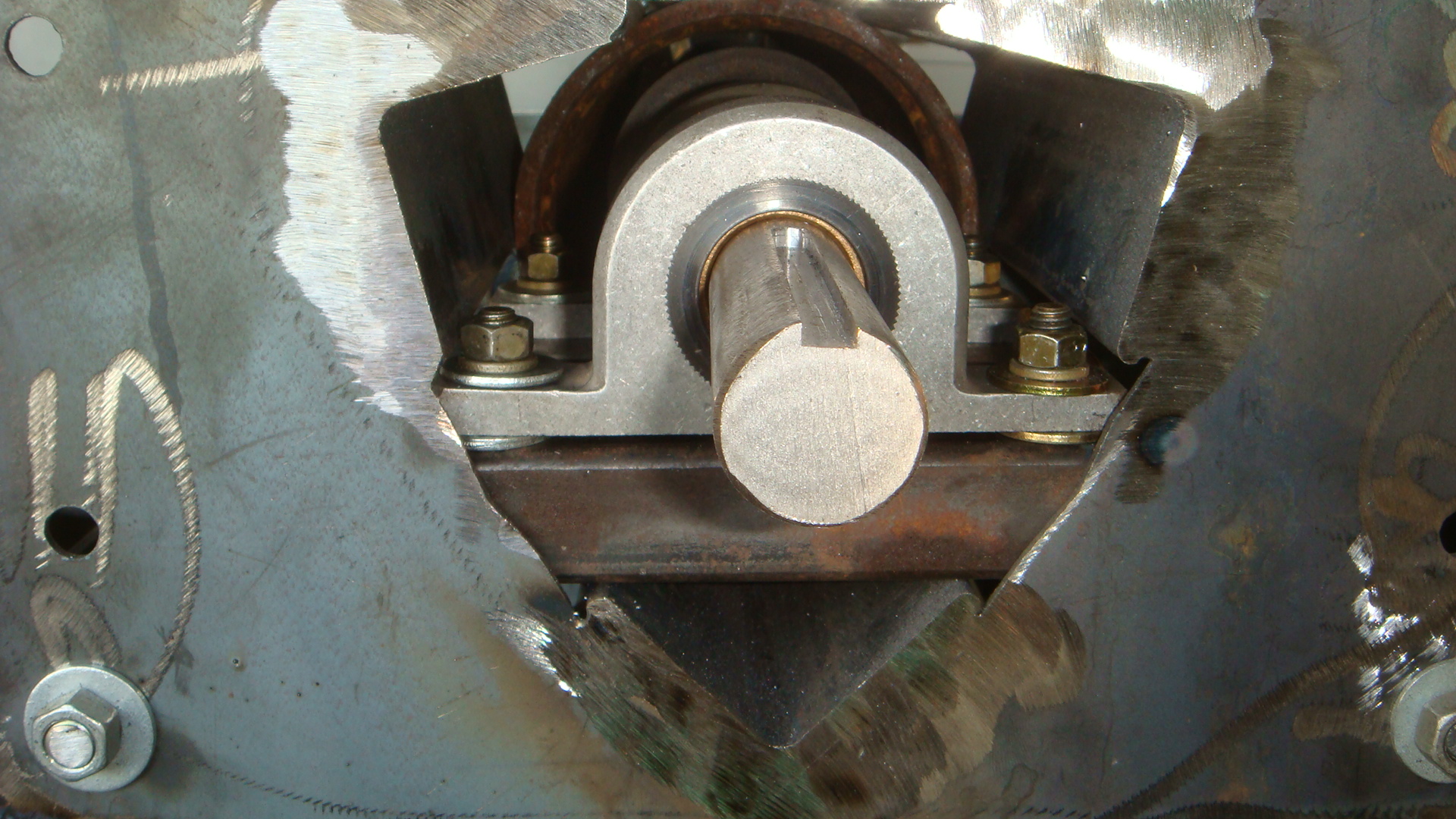
End view showing the machine pillow block bearings mounted onto 1 x 2 square tubing
Finally after some adjustment you can see the end result of the auger centered in the feed pipe.

Auger centered in pipe, cantilevered with two pillow block bearings
Auger Feed Rebuilding, Step one a DIY Record
Posted: November 2, 2012 Filed under: CNC Plasma Cutter, Homemade Boiler, Hopper and Feed | Tags: auger feed, CNC Plasma, DIY, homemade, homemade chip boiler, welding Leave a commentAfter last winter’s experience, I decided to start from scratch on the auger/hopper assembly. I varied the height several times through different burner designs. Now it looks like it was modified once too many times. The other main reason to rebuild the hopper assembly is the difficulty removing the burner from the boiler because it must stay balanced. I don’t remember exactly my thoughts at that point, I probably just had two wheels around the shop and was in a hurry.

2011 Hopper and Auger Assembly
So this fall I am rebuilding the hopper with a different auger drive system, and additional wheels and supports to make it much more robust and simple. The foundation of improvement in the new assembly is the ability to draw the parts in SketchUp as well as cut the parts with the CNC. Here’s a view of the cut out parts.
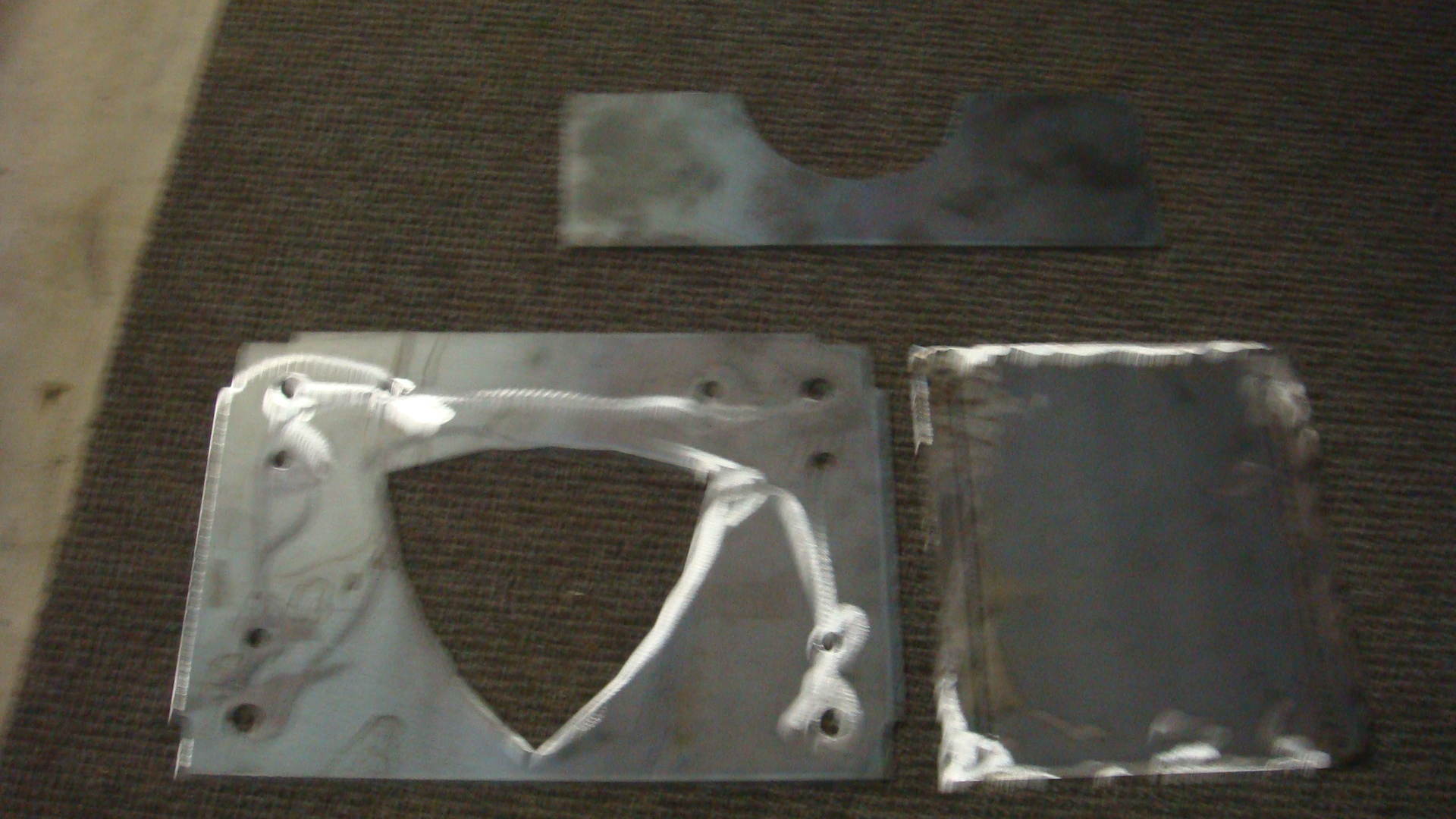
The parts laid out I call the saddle, angle iron, and side alignment plate.
The parts below are the angle iron plate with the side alignment plate. The angle iron plate is tabbed to fit into the slots of the side alignment plate, this way the parts are self aligning and jigging. Adding strength and ease of assembly. This makes the welding so much easier.
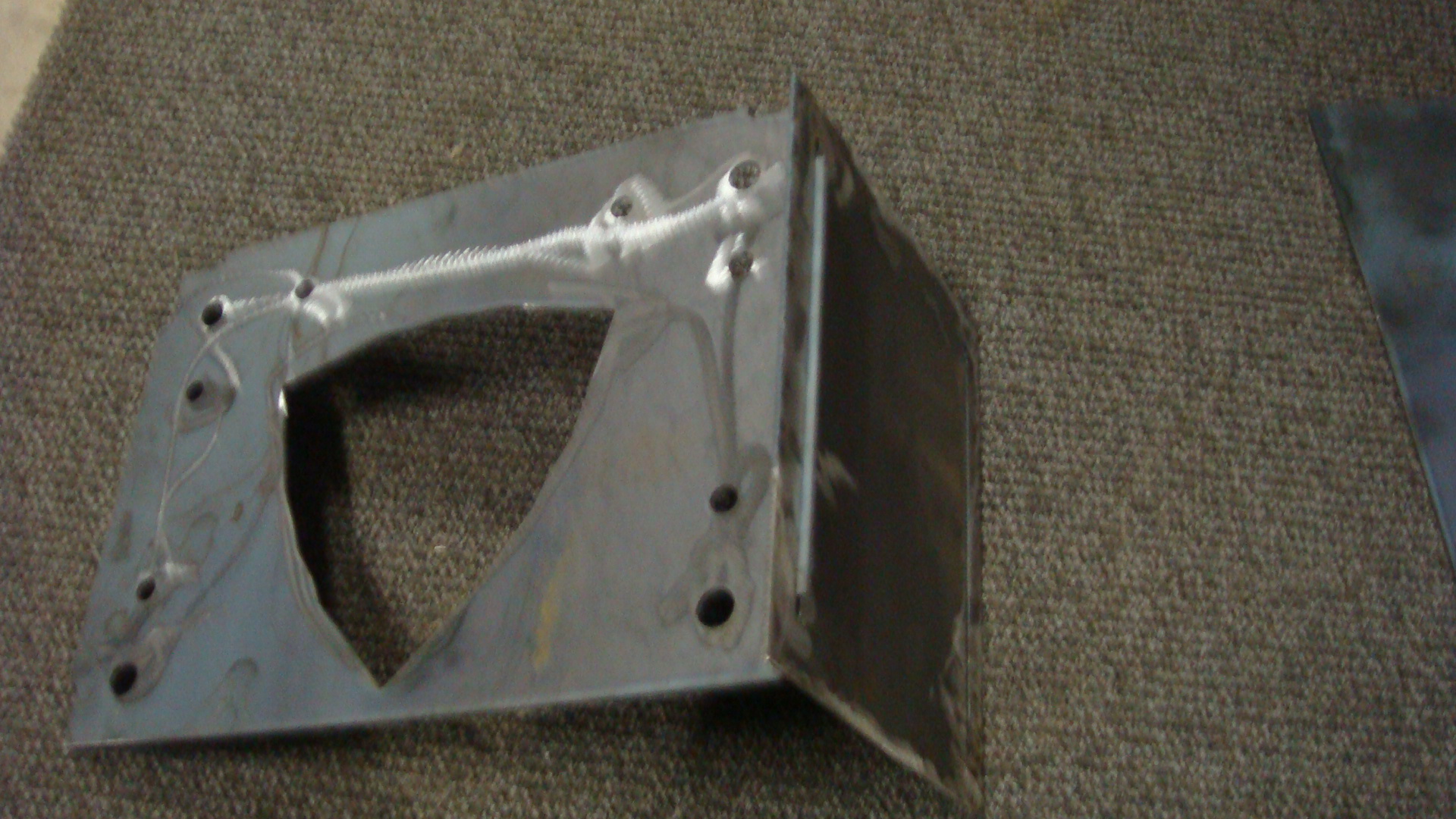
Finally here is the assembly on the welding table ready to weld, note the threaded rod, which also aids in the rigidity and ease of adjustment to make sure all the pieces are square and parallel prior to welding.

Unwelded auger drive weldment ready to be welded
And finally the partially finished welded assembly, this assembly will be the foundation to cantilever the auger in the feed pipe as well as support the auger drive motor and gears.

End view of the welded assembly
The CAD designed parts combined with the CNC, combined with self jigging design for success make a nice finished assembly with light material for cost savings combined with good strength.
Why spend your evenings and weekends welding and programming?
Posted: August 31, 2012 Filed under: Homemade Boiler | Tags: Arduino, currency fluctuation, oil, oil prices, welding Leave a commentI have been following the pre buy prices of oil for a while now. For those of you unfamiliar with the term “pre buy”. It is what is sounds like, the price of the oil you will have delivered is prepaid by you and you and your supplier determine how many gallons you should buy. If you over buy you can usually take the remaining gallons you bought in a final delivery and store that amount in your own tank for next year. If you can’t hold that much you get a refund, but my supplier would not hold that price for anything longer than one season. If I under bought they usually would allow me the pre buy price on additional gallons if I used their estimate of how many gallons to buy.
Below is a .pdf chart of the pre buy prices by year. Note the chart also has a straight line regression trendline based on the existing data. The line is extrapolated out and predicts what the coming years prices may become. Note also that for a period of years the trendline and the prices were relatively accurate and tight to the trendline. I think as time goes on the market may become more volatile. The world market for oil is currently in the dollar currency. This may also add to the price fluctuations as the dollar currency may become volatile as well as the oil market’s geopolitical issues may also add to the fluctuation. Makes me want to get off the merry go round. Note clicking on the link should bring up the chart as a pdf file. Bear with me as a I try different ways to express things in wordpress. Suggestions are welcome.
OpenLog partially tested
Posted: August 24, 2012 Filed under: Arduino, Data logging, OPenLog, Testing | Tags: Arduino, data logger, RTC, Thermister Leave a commentWell I have to say, I am not particularly impressed with OpenLog’s documentation but I finally got a sketch to work with OpenLog based heavily on the OpenLog command sketch. I soldered up a Yourduino.com Real time clock kit and am waiting on some male to male jumper wires to breadboard up a thermistor and clock to fully test the OpenLog data logging in a closer to real world trial. Of course until it is finally mounted in the boiler control box and mounted on the boiler this will only be the next step in testing.
Hard experience has taught me many things work on the desk that do not work in the field due often to poor electronic practice, missing diodes, filtering capacitors, missing resistors….
Here is the code which I intend to run when I get the project bread boarded, it compiles but is untested.
/*
RTC, Thermisoter, OpenLog test
One thermistor attached to analog pins 0
The Real time clock SDA pin is attached to analog 4, the RTC SCL pin is attached to analog pin 5
The circuit:
Inputs
* Thermister Analog in 0
* RTC SDA, Analog pin 4
* RTC SCL, Analog pin 5
Outputs
* Arduino digital 0 (rx), OpenLog TX
* Arduino digital 1 (tx), OpenLog Rx
* Arduino digital 2, OpenLog Grn
Created 8/24/12
http://www.frugaltinker.com
*/
#include <math.h> // include the library code for thermsiter functions
#include <Wire.h>
#include “RTClib.h”
//section for time keeping
int hour; //hour
int minute; //minute
int Roomtemp; //room temperature
int statLED = 13; //flashes LED connected to pin 13 for troubleshooting
int resetOpenLog = 2; //reset on OpenLog
long DataDwell = 60000; //seperates the data readings by 1 minute
long prevmillis =0; // previous millis
RTC_DS1307 RTC;
//define function to calculate the temperature in fahrenheit for Analog pin 0
double ThermisterRoom(int RawADC) {//beginning of function
double Temp;
Temp = log(((10240000/RawADC) – 10000));
Temp = 1 / (0.001129148 + (0.000234125 * Temp) + (0.0000000876741 * Temp * Temp * Temp));
Temp = Temp – 273.15; // Convert Kelvin to Celcius
Temp = (Temp * 9.0)/ 5.0 + 32.0; // Convert Celcius to Fahrenheit
return Temp;
}//end of function
void TimeSection() {//start time function
DateTime now = RTC.now();
hour=now.hour(),DEC; //get the hour from the RTC chip
minute=now.minute(),DEC; //get the minute from the RTC chip
}// end time function
void OpenLogData(){//start OpenLogData function
int RoomTemp = ThermisterRoom(analogRead(0)); //read from the sensor
Serial.print (hour);
Serial.print (“:”);
Serial.print (minute);
Serial.print (“, “);
Serial.println (RoomTemp);
}// end OpenLog Data section
void setup()
{//Begin Setup section
pinMode(statLED, OUTPUT); //set pin to output
pinMode(resetOpenLog, OUTPUT); //set pin to output
Serial.begin(9600); // initiate serial communication
//Reset OpenLog
digitalWrite(resetOpenLog, LOW);
delay(100);
digitalWrite(resetOpenLog, HIGH);
//Wait for OpenLog to respond with ‘<‘ to indicate it is alive and recording to a file
while(1) {
if(Serial.available())
if(Serial.read() == ‘<‘) break;
}
//Send three control z to enter OpenLog command mode
//Works with Arduino v1.0
Serial.write(26);
Serial.write(26);
Serial.write(26);
//Wait for OpenLog to respond with ‘>’ to indicate we are in command mode
while(1) {
if(Serial.available())
if(Serial.read() == ‘>’) break;
}
//send the open file
Serial.print(“Templog.txt\r”); //\r in string + regular print works with older v2.5 Openlogs
//Wait for OpenLog to return to waiting for a command
while(1) {
if(Serial.available())
if(Serial.read() == ‘>’) break;
}
// send the command to append the file
Serial.print(“append Templog.txt\r”);
//Wait for OpenLog to indicate file is open and ready for writing
while(1) {
if(Serial.available())
if(Serial.read() == ‘<‘) break;
}
//start process of setting clock time
Wire.begin();
RTC.begin();
RTC.adjust(DateTime(__DATE__, __TIME__));
} //End setup section
void loop()
{//Begin Loop section
if (millis()-prevmillis> DataDwell)
{//start if sections
TimeSection(); //displays the time
OpenLogData(); //saves the time and solar temp to the SD card
prevmillis=millis();
}// end if section
}//End loop section
OpenLog Firmware updated and tested
Posted: August 20, 2012 Filed under: Arduino, Data logging, OPenLog, Testing | Tags: data logger, micro SD, RTC, solar hot water Leave a commentOpenLog is a data logger from SparkFun electronics that is touted as being easy to use and a reliable writer to a microSd card. I haven’t found that to be true, I think it is a pain in the a** but maybe that’s the experience more than the actual product. I ordered the data logger in January and got busy and didn’t have the time to use it so I set it aside.
Really the only reason I ordered it was because I could not get GoBetwino, a Freeware Arduino Data logging software program to work. The GoBetwino program uses a USB connection to a computer connected to the Arduino to log to a file on the PC. A great concept that I tested and worked fine on the desktop machine. However on the laptop that I was using to make changes to the Arduino controlling the boiler in the shop it didn’t work. It seemed easier to come up with a standalone solution rather than troubleshoot the USB connections, the power managment issues with the Laptop etc. So I bought the data logger.
As I wrote in an earlier post since the time of my purchase of the OpenLog board it was recommended to update the firmware, this required updating the board with a FTDI board that accepts the USB connection from the PC to update the firmware, after 2-3 hours of frustration this task is finally completed. The main problem being Windows XP didn’t seem to recognize the FTDI board and assign it a com port but finally was able to find the correct driver and download the firmware.
I ran the test sketch, pulled the micro SD card and reviewed the data. The board did log the data correctly so the next step is to write a function that writes temperature data to a file with a time stamp. Since I have an Arduino on my desk with a real time clock chip that measures the outside temperature as well as the temperature of a solar hot water storage tank this would seem like a perfect application to test. After testing the function in that application it will be easy to modify the function for the monitoring of the boiler function. I prefer to write the code in functions and call the functions from the main body of the loop. This makes the code modular and easy to reuse. I comment very carefully and probably over comment, but I personally prefer to make the code painfully simple to understand on the assumption I may not look at the code again for a few years. I am hoping you will comment as well since your comments will no doubt improve the code.
I will post the function when I complete it. Thanks for reading.
 frugaltinker